Monday, October 6, 2014

Enabling Migrations in Entity Framework to update the database programatically

Migrations

Implementing migrations in entity framework

  • Open the Package Manager Console (Tools -> Library Package Manager -> Package Manager Console)
  • Select the project where the entity framework DataContext is contained and then in the console type Enable-Migrations

  • use the following code to update the migrations
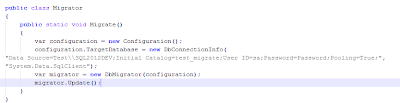
  • Now a call to the migrate method on the migrator will result in the database being updated automatically to the current version

Thursday, May 9, 2013

The Web server is configured to not list the contents of this directory. IIS 7.5 asp.net mvc

After adding an app in iis, and running it came across the following issue.

HTTP Error 403.14 - Forbidden

The Web server is configured to not list the contents of this directory.


fixed it using this post

Microsoft Windows [Version 6.1.7601]
Copyright (c) 2009 Microsoft Corporation.  All rights reserved.

C:\Windows\system32>cd C:\Windows\Microsoft.NET\Framework\v4.0.30319

C:\Windows\Microsoft.NET\Framework\v4.0.30319>aspnet_regiis -i
Microsoft (R) ASP.NET RegIIS version 4.0.30319.17929
Administration utility to install and uninstall ASP.NET on the local machine.
Copyright (C) Microsoft Corporation.  All rights reserved.
Start installing ASP.NET (4.0.30319.17929).
....................
Finished installing ASP.NET (4.0.30319.17929).

C:\Windows\Microsoft.NET\Framework\v4.0.30319>


another issue while logging in

solved with http://www.aspdotnet-suresh.com/2011/05/systemdatasqlclientsqlexception-login.html

Tuesday, July 17, 2012

error from asp.net 3.0 to asp.net 4.0

Error:
The type 'System.Web.Mvc.ModelClientValidationRule' exists in both 'd:\Program Files\Microsoft ASP.NET\ASP.NET Web Pages\v2.0\Assemblies\System.Web.WebPages.dll' and 'd:\Program Files\Microsoft ASP.NET\ASP.NET MVC 3\Assemblies\System.Web.Mvc.dll

Resolution:
Issue resolved as per http://www.asp.net/whitepapers/mvc4-release-notes#_Toc303253815

Methods (Copied from http://www.asp.net/whitepapers/mvc4-release-notes#_Toc303253815 for reference):


  1. In the root Web.config file, add a new <appSettings> entry with the key webPages:Version and the value 1.0.0.0.
  2. <appSettings>
        <add key="webpages:Version" value="1.0.0.0"/>
        <add key="ClientValidationEnabled" value="true"/>
        <add key="UnobtrusiveJavaScriptEnabled" value="true"/>
    </appSettings>
  3. In Solution Explorer, right-click the project name and then select Unload Project. Then right-click the name again and select Edit ProjectName.csproj.
  4. Locate the following assembly references:
    <Reference Include="System.Web.WebPages"/> <Reference Include="System.Web.Helpers" />
    Replace them with the following:
    <Reference Include="System.Web.WebPages, Version=1.0.0.0,
    Culture=neutral, PublicKeyToken=31bf3856ad364e35, processorArchitecture=MSIL "/> <Reference Include="System.Web.Helpers, Version=1.0.0.0,
    Culture=neutral, PublicKeyToken=31bf3856ad364e35, processorArchitecture=MSIL" />
  5. Save the changes, close the project (.csproj) file you were editing, and then right-click the project and select Reload.


Friday, June 29, 2012

Creating a kanban board with javascript

At SyneITY we follow the lean agile development methodology and to aid in our development we needed a kanban board and thought why not develop it using javascript, jquery and knockoutjs.

As usual, we are just starting out with a basic version and here is a mockup of what we were trying to achieve in the first iteration
Technologies we will be using:

  • Javascript
  • Jquery
  • Knockoutjs
  • Ajax

Wednesday, June 27, 2012

PHP Call to undefined function curl_init()

while working on php in windows using VS.PHP i came across this exception:
"Call to undefined function curl_init()"
Earlier when i had come across this exception, we had used this answer on stackoverflow to resolve this issue.
However the next time, on another machine, this method was not solving the issue. On analysis this was found out to be an issue of using VS.php which overwrites the php.ini file everytime it runs. So using the video at this link i just put the ini path in the visual studio debug and viola, the issue was resolved.